The K1 Stats watch application
The watch application records a kayak session with the raw motion of the hull. It shows the values of your stroke on the watch, at each stroke.
Not in the store yet
Watches: 64 Garmin modelsState: test period
The watch application is not in the Garmin Connect IQ Store yet. In the test period, test paddlers get it as a file for their watch. This page gets the link when the application is in the store.
Pages on the watch
The up and down buttons change the page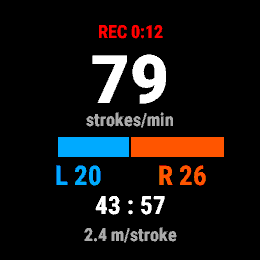
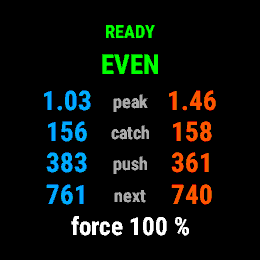
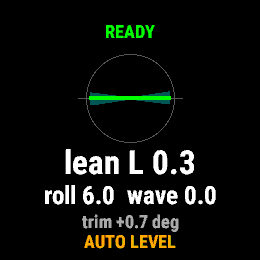
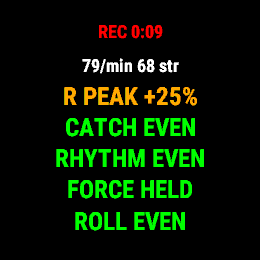
The pictures show the screen of the watch simulator. Their values come from the demo signal of the simulator, not from real paddling. The frame around each picture is a drawing.
What the application does
- Recording
- It records a kayak activity with GPS and with raw motion data: the acceleration and the turn rate of the hull, 100 times each second.
- Live pages
- Five pages: stroke rate, stroke curve, technique, lean and waves, effort summary. The stroke curve page shows the mean forward acceleration through one stroke for each side.
- Technique cue
- One short text tells you the largest difference between the sides, or "EVEN".
- Effort summary
- At the end of each effort, the watch shows the summary of that effort. The lap button also makes a summary.
- Settings
- A menu with three settings: tones, vibration, and the automatic summary page.
How to use it
- MountPut the watch on the deck in front of you, with the face to you. The watch must not move on the deck.
- RecordStart the application, wait for the GPS, then start the recording. Stop and save at the end.
- SendSync the watch with Garmin Connect, or copy the FIT file from the watch and upload it to K1 Stats.
Limits
- Watch models
- The application has a build for 64 Garmin watch models with five buttons and a gyroscope, for example the Forerunner 255, 265, 955 and 965, the fēnix 6 Pro, 7 and 8, and the epix (Gen 2). Only the Forerunner 955 has a test on a real watch. The other models have a test in the Garmin simulator.
- The hull, not the paddler
- The watch is on the deck. It measures the motion of the hull. The live values are an estimate, and they can be wrong.
- Not a Garmin product
- K1 Stats is not a product of Garmin, and Garmin does not endorse it. Garmin and Connect IQ are trademarks of Garmin Ltd. or its subsidiaries.